Kiesha Allen
Senior Product Designer
Interview me

GMC
New York Lottery Digital Playslips
Goals
To strengthen the connection between digital engagement and retail purchase, I designed a new mobile feature that converts saved numbers and Quick Picks into scannable digital playslips. Over a two-month design cycle, I developed an end-to-end flow that simplifies in-store play while improving clarity and user confidence.
Context
The existing app allowed users to save lucky numbers, browse games, and explore draws, but there was a critical gap: users could not generate playable slips directly from the app.
To play at a retailer, users had to manually open the app, locate their saved numbers, and rewrite them onto a physical playslip in-store. This created friction, slowed down the process, and weakened the connection between digital engagement and real-world purchase.
The Problem
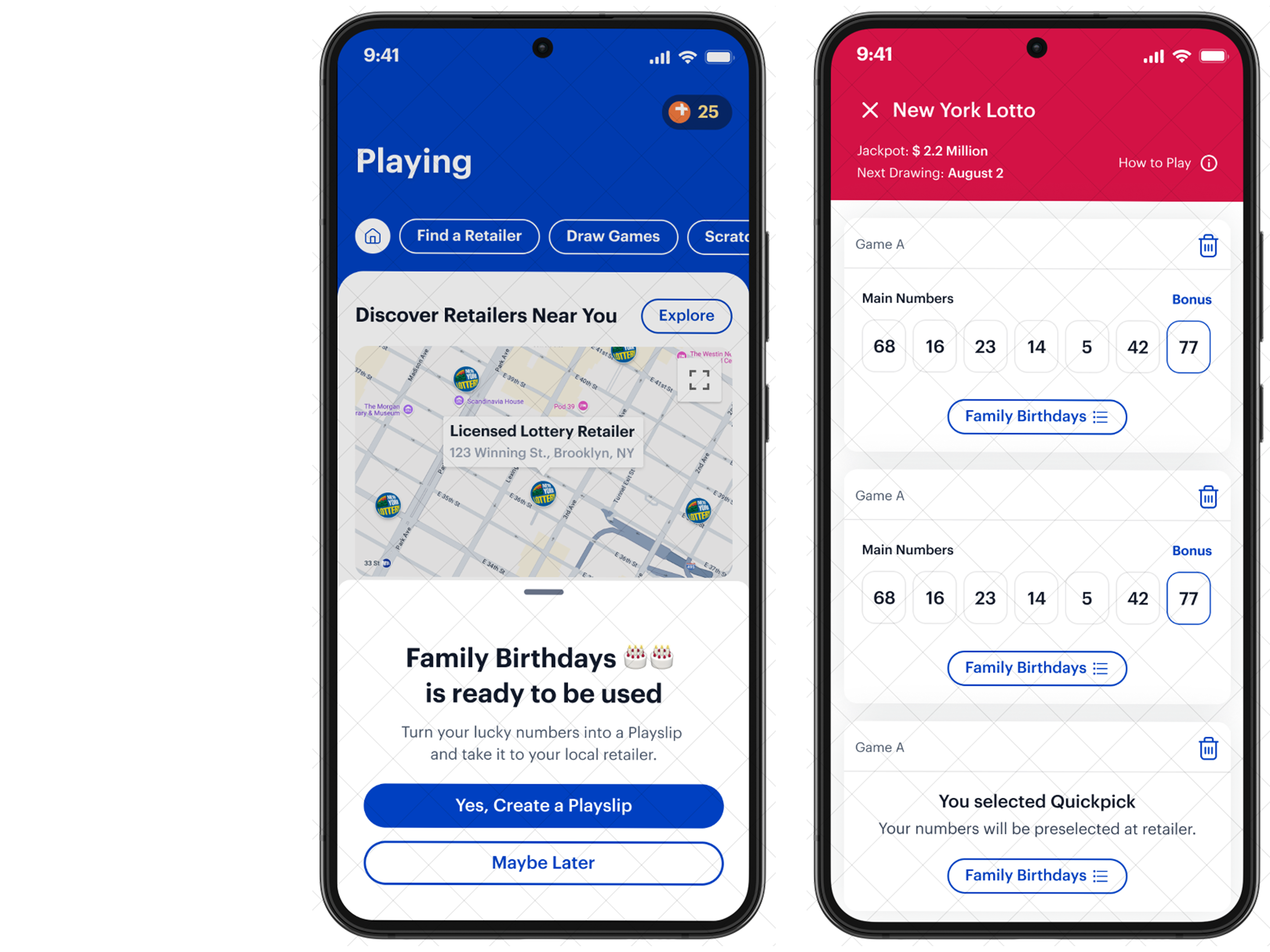
Users were already engaging with the app to save numbers and explore games, but the transition from digital to retail purchase was inefficient. There was no streamlined way to take saved selections and convert them into something actionable at a retailer. Additionally, filling out physical playslips requires mental math to calculate total cost, which can be confusing when playing multiple lines or adding extras.
The in-store process relied heavily on memory and manual input. We needed to create a flow that felt intuitive, mirrored real-world behavior where appropriate, and improved clarity beyond what paper could offer.
What We DEsigned and why
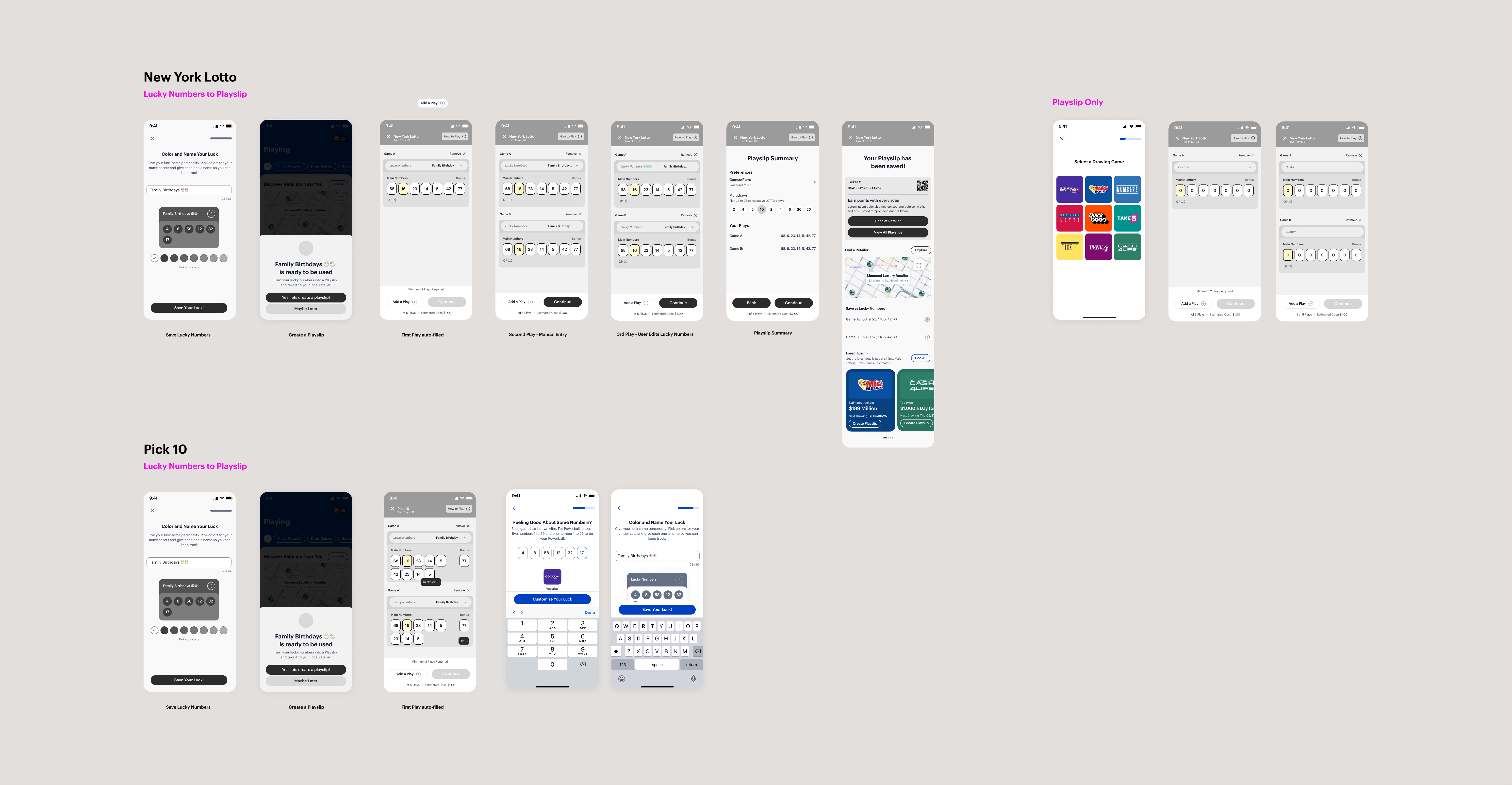
I designed a new “Digital Playslips” section within the app, accessible both as a primary navigation destination and as a contextual prompt after users save lucky numbers. This ensured the feature felt integrated rather than separate.
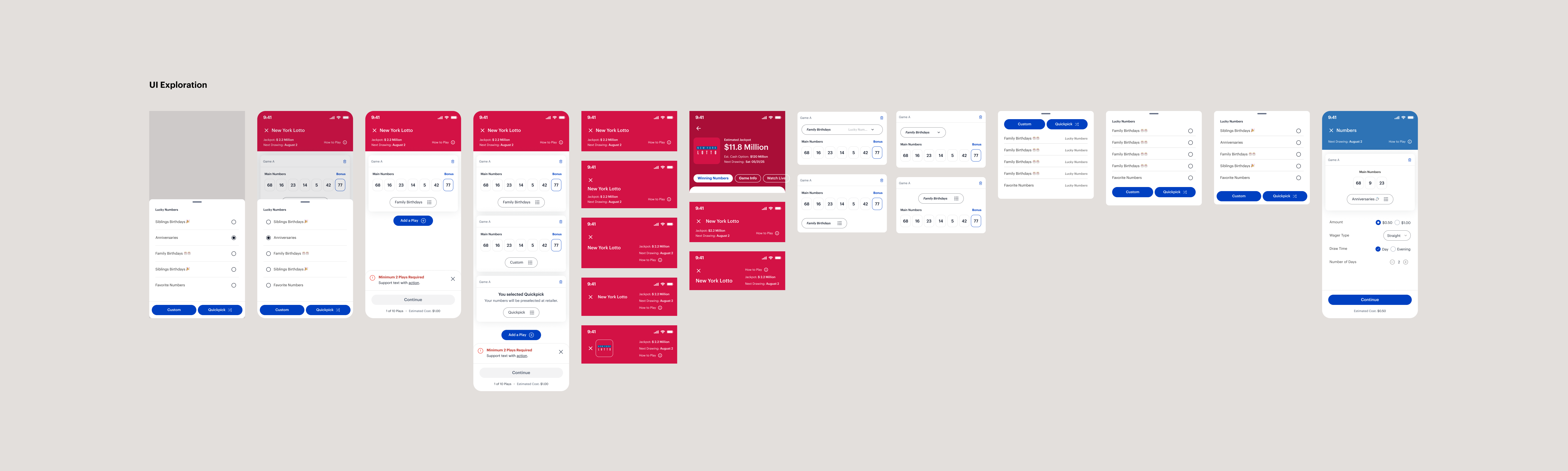
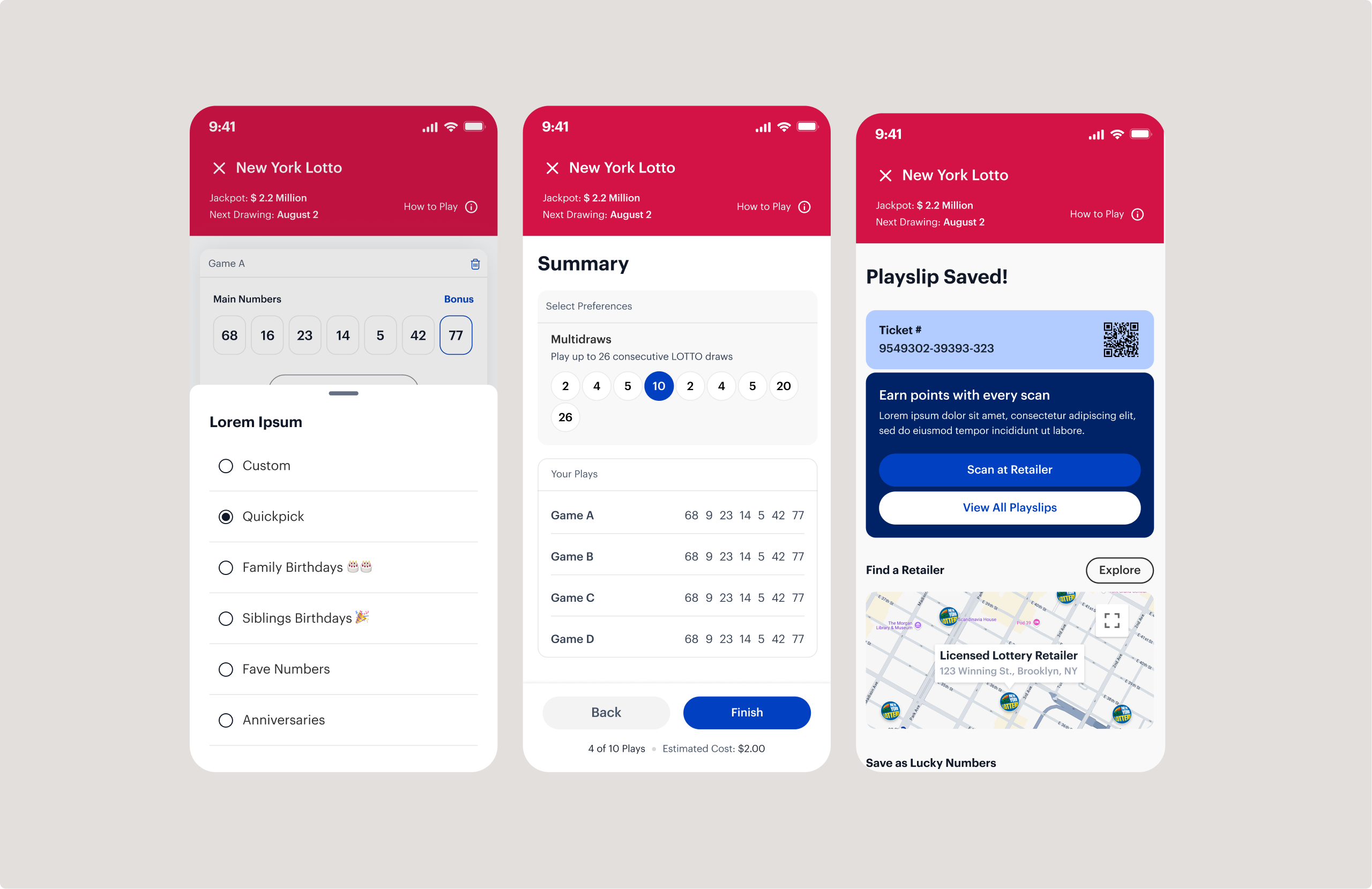
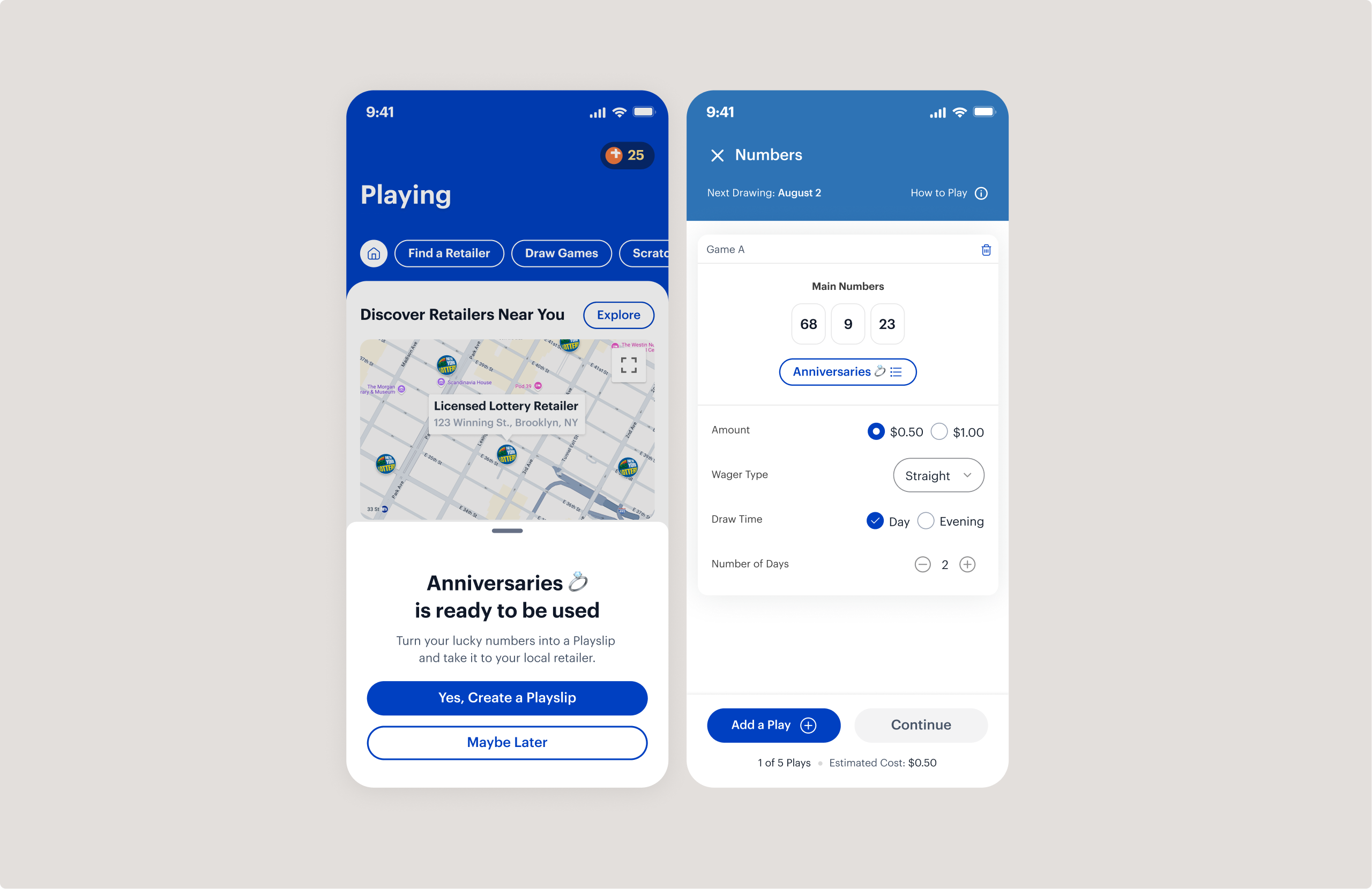
The creation flow was intentionally designed to feel familiar to users who are accustomed to filling out physical playslips. Users could manually select numbers, choose Quick Pick options, and configure gameplay exactly as they would in person. However, the digital experience improved on the physical one by making interactions clearer and more guided.
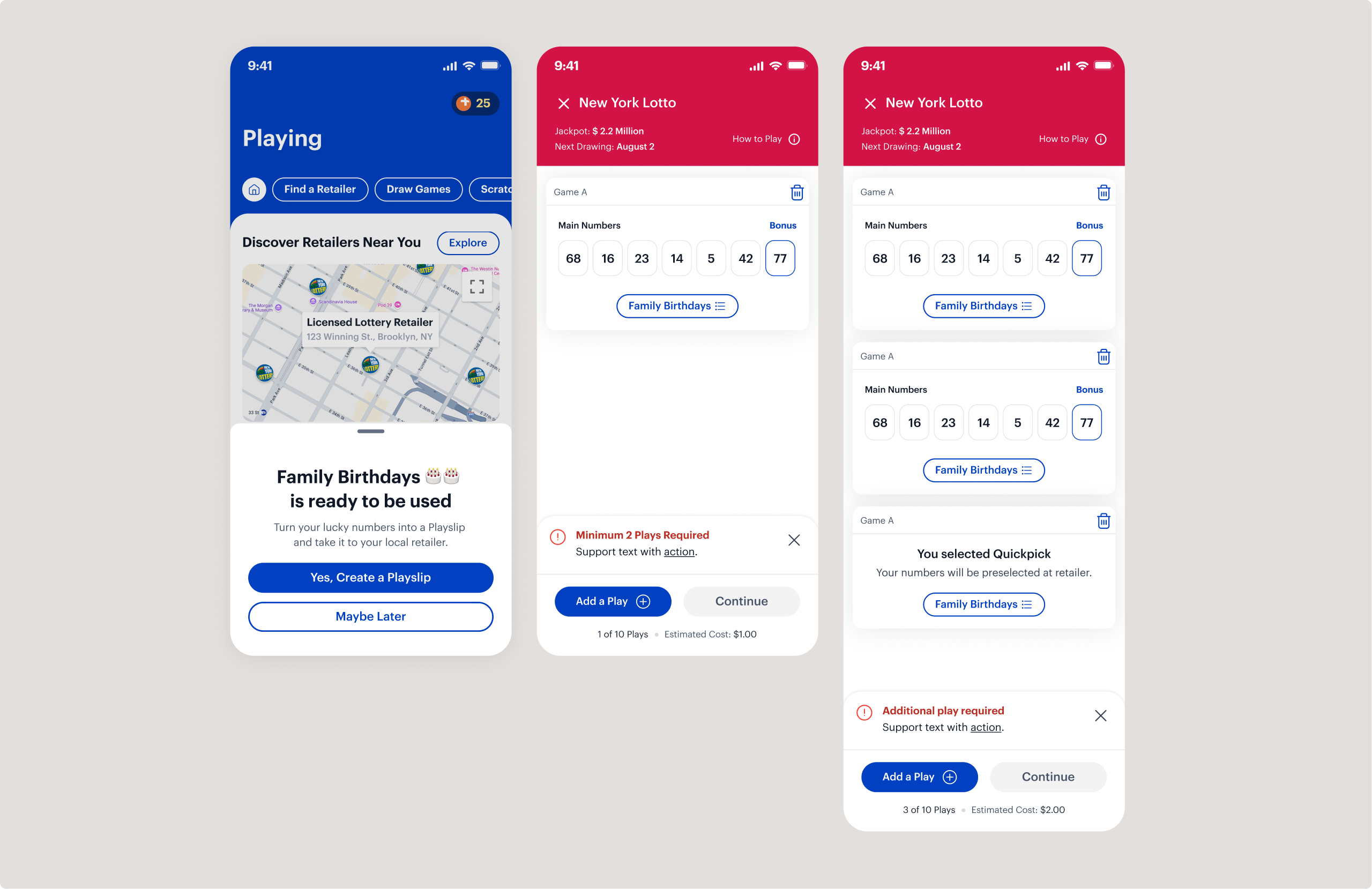
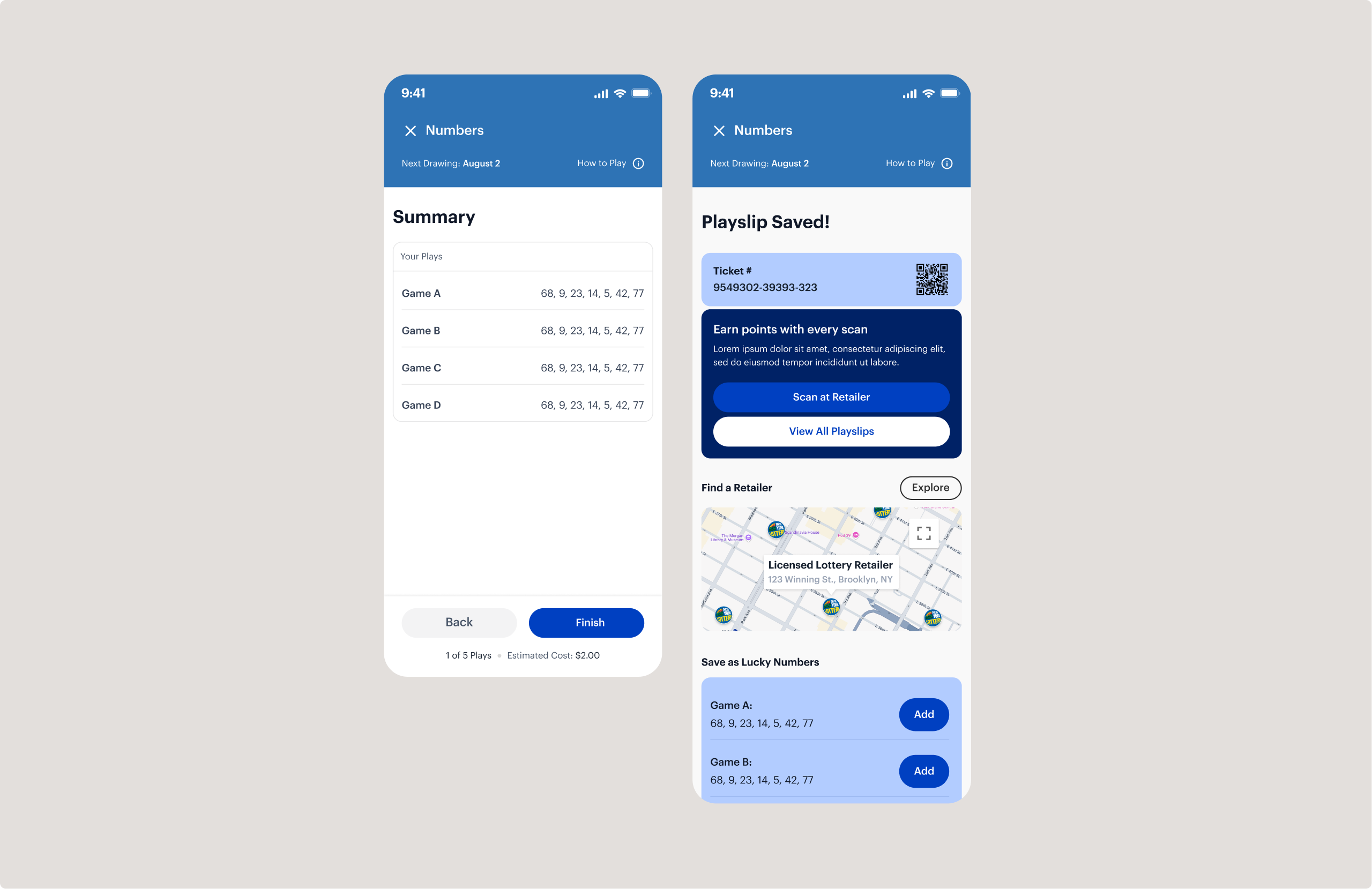
One of the key enhancements was dynamic price calculation. Instead of requiring users to mentally calculate totals as they add lines or options, the total price updates in real time and remains visible at the bottom of the screen. This reduces cognitive load and increases purchase confidence.
Challenge:
Users were accustomed to filling out paper playslips, so a fully digital version risked feeling unfamiliar or confusing.
Solution:
I designed the flow to mirror real-world play behavior while enhancing clarity through guided interactions, structured steps, and intuitive number selection patterns.
Challenge:
In physical settings, users calculate pricing mentally and review selections informally, which can lead to confusion.
Solution:
I introduced dynamic price calculation and a clear summary review screen, giving users real-time cost visibility and confirmation before saving and scanning at a retailer.
Kiesha Allen
Senior Product Designer
Interview me
GMC
New York Lottery Digital Playslips
Goals
To strengthen the connection between digital engagement and retail purchase, I designed a new mobile feature that converts saved numbers and Quick Picks into scannable digital playslips. Over a two-month design cycle, I developed an end-to-end flow that simplifies in-store play while improving clarity and user confidence.
Context
The existing app allowed users to save lucky numbers, browse games, and explore draws, but there was a critical gap: users could not generate playable slips directly from the app.
To play at a retailer, users had to manually open the app, locate their saved numbers, and rewrite them onto a physical playslip in-store. This created friction, slowed down the process, and weakened the connection between digital engagement and real-world purchase.
The Problem
Users were already engaging with the app to save numbers and explore games, but the transition from digital to retail purchase was inefficient. There was no streamlined way to take saved selections and convert them into something actionable at a retailer. Additionally, filling out physical playslips requires mental math to calculate total cost, which can be confusing when playing multiple lines or adding extras.
The in-store process relied heavily on memory and manual input. We needed to create a flow that felt intuitive, mirrored real-world behavior where appropriate, and improved clarity beyond what paper could offer.
What We DEsigned and why
I designed a new “Digital Playslips” section within the app, accessible both as a primary navigation destination and as a contextual prompt after users save lucky numbers. This ensured the feature felt integrated rather than separate.
The creation flow was intentionally designed to feel familiar to users who are accustomed to filling out physical playslips. Users could manually select numbers, choose Quick Pick options, and configure gameplay exactly as they would in person. However, the digital experience improved on the physical one by making interactions clearer and more guided.
One of the key enhancements was dynamic price calculation. Instead of requiring users to mentally calculate totals as they add lines or options, the total price updates in real time and remains visible at the bottom of the screen. This reduces cognitive load and increases purchase confidence.
Challenges
Solutions
Users were accustomed to filling out paper playslips, so a fully digital version risked feeling unfamiliar or confusing.

I designed the flow to mirror real-world play behavior while enhancing clarity through guided interactions, structured steps, and intuitive number selection patterns.
In physical settings, users calculate pricing mentally and review selections informally, which can lead to confusion.
I introduced dynamic price calculation and a clear summary review screen, giving users real-time cost visibility and confirmation before saving and scanning at a retailer.
Kiesha Allen
Senior Product Designer
Interview me
GMC
New York Lottery Digital Playslips
Goals
To strengthen the connection between digital engagement and retail purchase, I designed a new mobile feature that converts saved numbers and Quick Picks into scannable digital playslips. Over a two-month design cycle, I developed an end-to-end flow that simplifies in-store play while improving clarity and user confidence.
Context
The existing app allowed users to save lucky numbers, browse games, and explore draws, but there was a critical gap: users could not generate playable slips directly from the app.
To play at a retailer, users had to manually open the app, locate their saved numbers, and rewrite them onto a physical playslip in-store. This created friction, slowed down the process, and weakened the connection between digital engagement and real-world purchase.
The Problem
Users were already engaging with the app to save numbers and explore games, but the transition from digital to retail purchase was inefficient. There was no streamlined way to take saved selections and convert them into something actionable at a retailer. Additionally, filling out physical playslips requires mental math to calculate total cost, which can be confusing when playing multiple lines or adding extras.
The in-store process relied heavily on memory and manual input. We needed to create a flow that felt intuitive, mirrored real-world behavior where appropriate, and improved clarity beyond what paper could offer.
What We DEsigned and why
I designed a new “Digital Playslips” section within the app, accessible both as a primary navigation destination and as a contextual prompt after users save lucky numbers. This ensured the feature felt integrated rather than separate.
The creation flow was intentionally designed to feel familiar to users who are accustomed to filling out physical playslips. Users could manually select numbers, choose Quick Pick options, and configure gameplay exactly as they would in person. However, the digital experience improved on the physical one by making interactions clearer and more guided.
One of the key enhancements was dynamic price calculation. Instead of requiring users to mentally calculate totals as they add lines or options, the total price updates in real time and remains visible at the bottom of the screen. This reduces cognitive load and increases purchase confidence.
The layout prioritized clarity. The selected vehicle and matched dealership were given visual prominence, with supporting information structured in a secondary card rather than scattered across the page. This shift reduced cognitive overload and made the next step obvious.
The result was a cleaner, more focused interface that emphasized the user’s chosen vehicle instead of burying it among competing information.
Stakeholders responded strongly to the clarity and prominence of the selected vehicle within the layout. The concept successfully won internal approval, and Buick was chosen as the first brand to move forward with fully fleshing out the AI-driven purchase vision beginning in 2026.
Challenges
Solutions
Users were accustomed to filling out paper playslips, so a fully digital version risked feeling unfamiliar or confusing.

I designed the flow to mirror real-world play behavior while enhancing clarity through guided interactions, structured steps, and intuitive number selection patterns.
In physical settings, users calculate pricing mentally and review selections informally, which can lead to confusion.
I introduced dynamic price calculation and a clear summary review screen, giving users real-time cost visibility and confirmation before saving and scanning at a retailer.